Many folks don't know that they can create different user profiles within a
Firefox browser quite similat to creating different users in a OS. Different profile for different persons sharing the same computer is a cool feature respecting the privacy of each users. The process is quite simple:
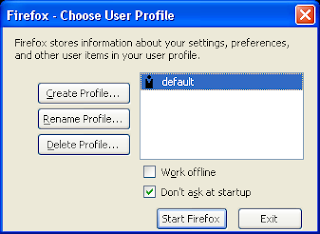
- Close Firefox, make sure Firefox is not running, check in taskbar.
- Goto start > run
- type 'firefox -p'
- A new dialog box will open up, asking for creating the profile , then follow the instructions.
- You can make the firefox to ask you everytime to use a particular profile, by unchecking the checkbox -Don't ask at startup.

